
Token Approvals Explained: Audit What Your Wallet Allows Contracts to Spend

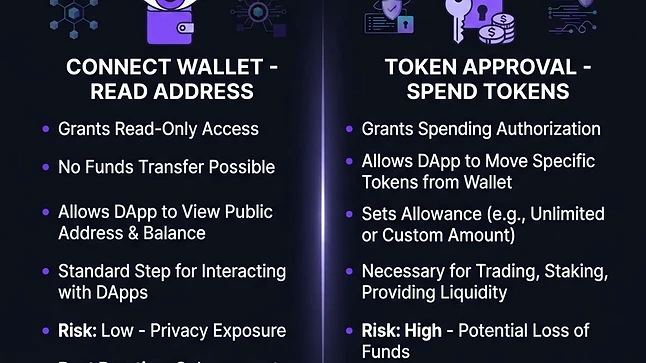
Disconnecting a website does not revoke its token permissions. Learn how allowances, signatures and revocations actually differ.
Connecting and approving are different actions
Connecting a wallet generally lets a website see selected public addresses and request actions. It does not, by itself, give the website unrestricted access to your funds. A token approval is different: for many ERC-20 tokens, it authorizes a particular spender contract to transfer tokens from your address up to an allowance.
That allowance exists on-chain and can remain active after you close the page or disconnect the site. This distinction explains why cleaning up connected websites is useful for privacy but is not a substitute for reviewing spending permissions.
Limited and unlimited allowances
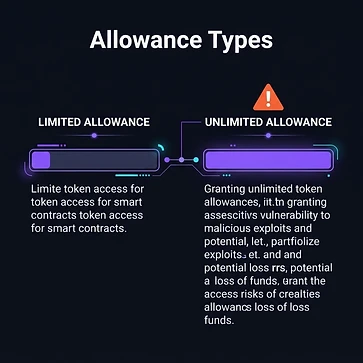

A limited allowance restricts how many tokens the approved spender can transfer. An unlimited allowance often uses a very large numerical value so that repeated interactions do not require new approvals. This can be convenient, but a compromised or malicious spender may expose a much larger balance.
For example, approving 50 units of a conventional token typically limits that spender to the remaining allowance, whereas an unlimited approval may expose tokens you deposit later as well. Token implementations vary, so do not assume every asset follows identical accounting behavior.
Signatures deserve the same attention as transactions
Some permission systems use signed messages, including permit-style approvals. A signature can authorize asset movement even when the signing step itself does not require gas. Other systems add intermediate permission contracts and their own expirations or limits.
Read the spender, asset, amount, network and deadline whenever the wallet can display them. A message that is unreadable or inconsistent with the action you intended is a reason to stop. NFT collection-wide permissions can also be broader than approval for a single item.
Build a permission-review routine
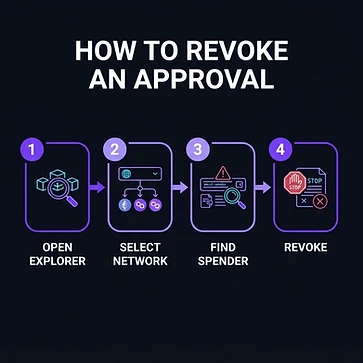

- Start from a bookmarked explorer or independently verified allowance-management tool.
- Review each network separately; permissions do not disappear across all chains at once.
- Identify the actual spender contract, not only a friendly website name.
- Revoke permissions you no longer need and confirm the transaction succeeds.
- Keep enough native currency to pay the revocation fee.
Revocation is itself an on-chain action and can race with other transactions. It cannot undo a transfer that has already completed. Fake revocation websites are another phishing route, so never follow unsolicited emergency links.
Know when revocation is not enough
If someone has your recovery phrase or private key, they can sign new transactions themselves. Revoking allowances does not restore exclusive control. Treat the wallet as compromised and use a carefully verified recovery process involving fresh keys generated securely. Avoid entering a seed phrase into a supposed support or scanning tool.
Regular permission review reduces one category of risk. It does not replace secure key storage, software updates or transaction review, but it makes the access you have granted much easier to understand.
Educational security guidance. Illustrations are AI-generated conceptual artwork.
Comments (0)
Be the first to comment.