
Wallet Security Essentials: Protecting Your Crypto from Hackers
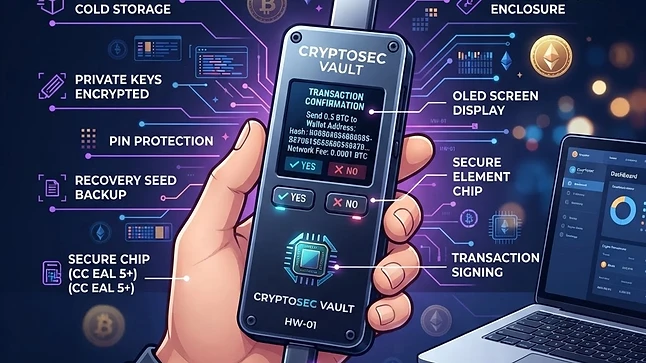
Your crypto is only as safe as your wallet. Learn about hardware wallets, seed phrase protection, phishing prevention, and multi-signature security.
Why Wallet Security Is Critical
In traditional finance, if your bank account is hacked, the bank or insurance covers your losses. In crypto, you are your own bank — which means you bear full responsibility for security. A single mistake can result in permanent, irreversible loss of your funds. This guide covers the essential practices every crypto holder should follow.
Understanding Wallet Types
Hot Wallets (Software)
Hot wallets are connected to the internet — mobile apps, desktop applications, and browser extensions. They're convenient for frequent transactions but more vulnerable to attacks.
- Best for: Small amounts, daily transactions, interacting with DeFi.
- Risk: If your device is compromised, your funds are at risk.
- Examples: MetaMask, Trust Wallet, Exodus.
Cold Wallets (Hardware)
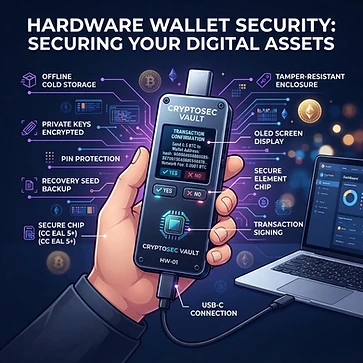
Hardware wallets store your private keys offline on a physical device. Even if your computer is infected with malware, your keys remain safe because transactions must be signed on the device itself.
- Best for: Long-term storage of significant amounts.
- Risk: Physical loss or damage (mitigated by seed phrase backup).
- Examples: Ledger, Trezor, Keystone.
The Golden Rule
Keep only what you need for transactions in hot wallets. Store the majority of your holdings in a hardware wallet. A common split is 90% cold storage, 10% hot wallet.
Seed Phrase Protection
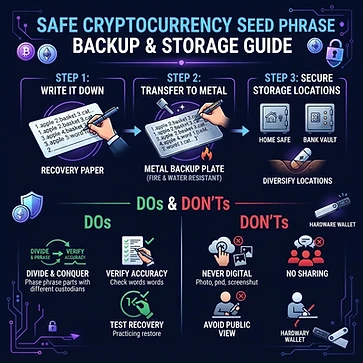

Your seed phrase (also called recovery phrase or mnemonic) is the master key to your wallet. Anyone with access to it can steal all your funds. Protect it with your life.
Do's
- Write it on paper — Never store it digitally (no photos, no cloud, no text files).
- Store in multiple secure locations — Consider a fireproof safe and a safety deposit box.
- Use metal backup — Steel plates engraved with your seed phrase survive fire, water, and physical damage.
- Verify periodically — Test your backup by restoring your wallet on a separate device.
Don'ts
- Never enter it on a website — No legitimate service will ever ask for your seed phrase.
- Never photograph it — Photos sync to cloud services and can be intercepted.
- Never share it — Not with support, not with friends, not with anyone.
- Never store it on a password manager — Even encrypted digital storage can be breached.
Phishing Prevention
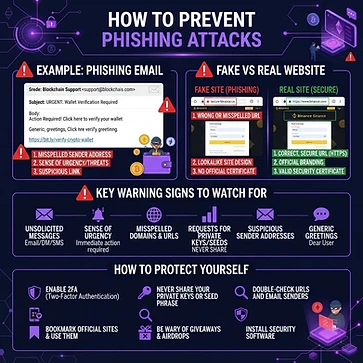

Phishing is the most common attack vector in crypto. Attackers impersonate legitimate services to steal your credentials or trick you into authorizing malicious transactions.
Common Phishing Tactics
- Fake websites — Domains that look almost identical to real ones (e.g.,
coinbase-login.cominstead ofcoinbase.com). - Email spoofing — Emails that appear to come from legitimate exchanges asking you to verify your account.
- Social media scams — Fake customer support accounts replying to your posts.
- Malicious browser extensions — Extensions that look legitimate but steal your wallet data.
- Clipboard hijacking — Malware that replaces copied wallet addresses with the attacker's address.
How to Protect Yourself
- Always verify URLs — Bookmark official sites and access them from your bookmarks.
- Check for HTTPS — Look for the lock icon, but remember HTTPS doesn't guarantee legitimacy.
- Never click links in emails — Type the URL manually or use bookmarks.
- Double-check wallet addresses — Always verify the first and last 6 characters before sending.
- Use a dedicated browser — Consider a separate browser profile for crypto activities.
Two-Factor Authentication (2FA)
Always enable 2FA on all exchange and wallet accounts. But not all 2FA is created equal:
- Authenticator apps (best) — Google Authenticator, Authy, or hardware-based 2FA keys (YubiKey).
- SMS 2FA (avoid) — Vulnerable to SIM-swapping attacks where attackers convince your carrier to transfer your number to their device.
Multi-Signature Wallets
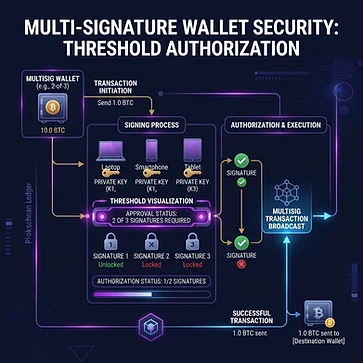

Multi-signature (multi-sig) wallets require multiple private keys to authorize a transaction. For example, a 2-of-3 multi-sig wallet requires any 2 of 3 keys to approve a transaction.
Benefits
- No single point of failure — If one key is compromised, funds remain safe.
- Shared control — Ideal for businesses, families, or partnerships.
- Geographic distribution — Store keys in different physical locations.
Use Cases
- Business treasury — Require multiple approvals for large transactions.
- Inheritance planning — Ensure family members can access funds if something happens to you.
- Institutional custody — Exchanges and funds use multi-sig for added security.
Additional Security Best Practices
- Use a VPN on public Wi-Fi networks.
- Keep software updated — Wallet and OS updates include security patches.
- Separate emails — Use a dedicated email address for crypto accounts.
- Be skeptical of airdrops — Free tokens often require connecting your wallet to malicious smart contracts.
- Review smart contract approvals — Use tools like Revoke.cash to audit and revoke token approvals.
- Consider a clean device — A dedicated, freshly installed device for crypto activities minimizes malware risk.
What to Do If You're Compromised
If you suspect your wallet or exchange account has been compromised:
- Immediately transfer funds to a new wallet with a fresh seed phrase.
- Change passwords on all related accounts.
- Revoke token approvals on blockchain explorers.
- Report the incident to relevant exchanges and authorities.
- Document everything for potential insurance claims or legal action.
Security is not a one-time setup — it's an ongoing practice. The crypto landscape evolves, and so do attack methods. Stay informed, stay vigilant, and never let convenience override security.
Comments (0)
Be the first to comment.