
Using Kraken Pro: Advanced Trading Features
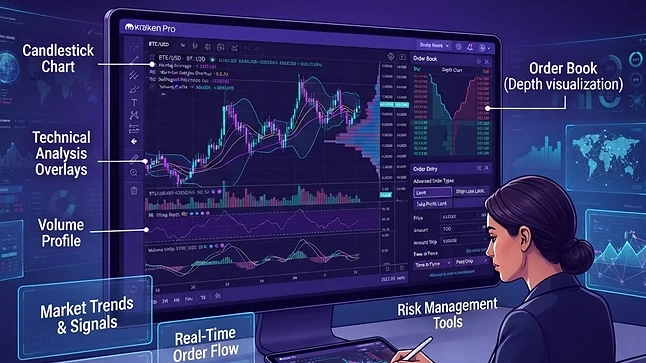
Kraken Pro offers more control than a basic exchange interface, including detailed charts, order types, and market depth tools. This guide introduces beginners to advanced features in a practical way without assuming prior trading experience.
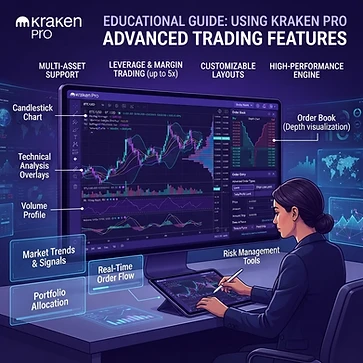
Kraken Pro is designed for users who want more trading tools than a simple buy-and-sell screen. Even if you are still a beginner, learning the platform layout can help you understand how markets, order books, and professional order types work.
What makes Kraken Pro different
Compared with a basic exchange interface, Kraken Pro usually offers:
- Advanced charts
- Order book and recent trade data
- Multiple order types
- Better visibility into fees and execution
- More control over entries and exits
That extra control is useful, but it also means there is more to learn before placing a trade.
Understand the main layout
When you open Kraken Pro, you will usually see:
- A price chart
- An order book showing bids and asks
- A trade history feed
- An order entry panel
- Your open orders and balances
Spend time observing the layout before placing real orders.
Learn the key order types
The most important feature for beginners is understanding order types.
Common examples:
- Market order: buys or sells immediately at the best available price
- Limit order: sets the maximum buy price or minimum sell price you will accept
- Stop order: triggers when price reaches a chosen level
- Take-profit or stop-loss tools: used for planned exits where supported
Beginners often benefit from limit orders because they provide more control over price.
Use charts and market depth
Kraken Pro charts can help you review price movement over different time frames.
Useful things to watch:
- Support and resistance areas
- Trading volume
- Short-term versus long-term trend direction
- Spread between bid and ask prices
The order book helps you see where buyers and sellers are currently placed, though it can change quickly.
Practical beginner workflow
A careful first trade might look like this:
- Fund your Kraken account
- Open the market pair you want to trade, such as BTC/USD
- Review the chart and spread
- Enter a small limit order
- Double-check size, price, and estimated fee
- Submit the order and watch whether it fills
This is often a better learning experience than using a large market order right away.
Risk controls and good habits
If you use advanced trading tools, keep these habits in mind:
- Start with very small position sizes
- Avoid using leverage unless you fully understand it and it is available in your region
- Review all fees before trading frequently
- Keep records of each trade and why you entered it
- Never trade based only on social media hype
Kraken Pro can feel intimidating at first, but it is an excellent platform for learning how real market structure works. Move slowly, use small orders, and focus on understanding the tools before trying to trade actively.
Comments (0)
Be the first to comment.