
Creating and Setting Up a Trust Wallet
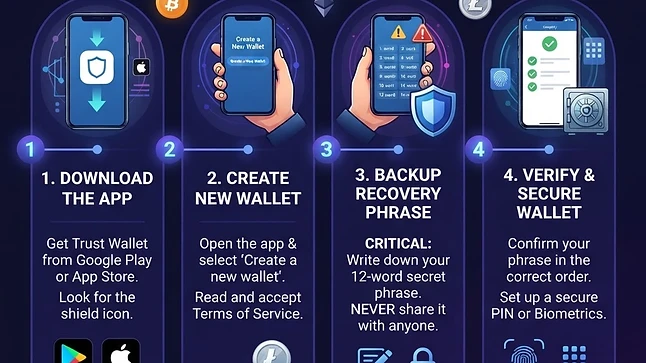
Trust Wallet is a mobile self-custody wallet that supports many blockchains and tokens in one app. This guide shows beginners how to create a wallet, back it up safely, and prepare it for secure everyday use.
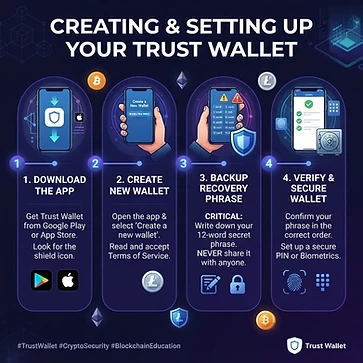
Trust Wallet is a popular mobile wallet for storing and managing crypto assets across multiple networks. Because it is a self-custody wallet, you control the recovery phrase and the funds, which makes setup security extremely important.
Install the official app
Download Trust Wallet only from the official website or your device's verified app store listing.
After installing:
- Open the app
- Tap Create a new wallet
- Read the wallet and backup notices carefully
- Set a passcode or biometric lock if available
This device lock helps protect local access, but your main backup is still the recovery phrase.
Back up your recovery phrase
During setup, Trust Wallet will display a recovery phrase.
Do this immediately:
- Write the phrase down by hand
- Store it offline in a secure location
- Check the word order carefully
- Never share it with anyone
Never do these things:
- Save it in screenshots
- Send it to yourself by email or chat
- Store it in cloud notes without strong encryption
If someone gets your recovery phrase, they can restore your wallet and take your funds.
Learn the wallet layout
Once setup is complete, take a few minutes to explore the app.
You will usually find sections for:
- Wallet balances
- Send and receive buttons
- Swap or buy features
- Browser or dApp access, depending on device and version
- Settings and security options
Understanding where these tools are located makes later transactions much less stressful.
Add or manage tokens
Trust Wallet supports many assets, but not every token appears by default.
You may need to:
- Search for a token in the wallet list
- Enable the correct network version
- Import a custom token using its official contract address
Always verify contract addresses from trusted sources before importing.
Receive and send crypto carefully
When receiving crypto:
- Select the correct asset
- Confirm the correct network
- Copy your wallet address exactly
- Test with a small amount first if possible
When sending:
- Paste the recipient address carefully
- Double-check the network
- Review the fee before confirming
Security best practices
Build these habits early:
- Enable device biometrics or passcode lock
- Keep your phone updated
- Avoid unknown links and fake support messages
- Use a separate wallet for higher-risk dApps
- Consider a hardware wallet for larger holdings
Trust Wallet can be a convenient starting point for crypto beginners, but the wallet is only as safe as your backup and your daily security habits.
Comments (0)
Be the first to comment.