
How to Create and Verify a Binance Account
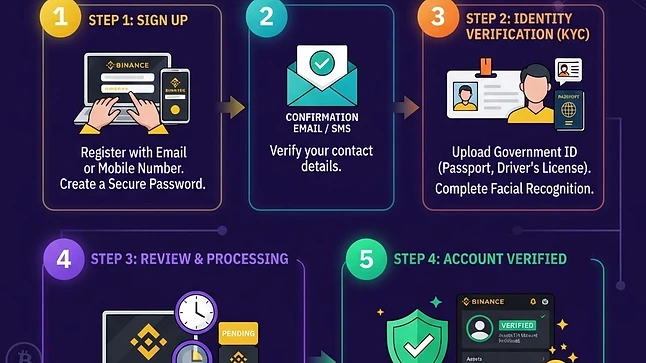
Creating a Binance account is straightforward, but the verification steps can feel intimidating if you are new to crypto. This guide walks through registration, identity checks, and basic security settings so you can get started safely.

Binance is one of the largest cryptocurrency exchanges, and opening an account usually takes only a few minutes. The important part is not just signing up, but also securing and verifying your account properly before you deposit money.
Before you begin
Have these ready:
- A valid email address or mobile number
- A strong, unique password
- A government-issued ID
- A smartphone for security codes and photo verification
- A stable internet connection
Create your account
Go to the official Binance website or download the official app from your device's app store. Double-check the URL before entering any information to avoid phishing sites.
Then follow these steps:
- Click Sign Up
- Register with your email or phone number
- Create a strong password with letters, numbers, and symbols
- Enter a referral code if you have one
- Confirm the verification code sent to your email or phone
Once you log in, Binance may ask a few quick questions about your country and account type.
Verify your identity
Most Binance features require identity verification, also called KYC. This helps comply with regulations and improves account security.
Typical steps include:
- Enter your full legal name
- Add your date of birth and address
- Upload photos of your passport, national ID, or driver's license
- Complete a selfie or face scan
Make sure:
- Your ID is not expired
- Photos are clear and not cropped
- The information matches exactly
Verification can be approved quickly, but sometimes it takes longer if the images are unclear or extra review is needed.
Secure the account immediately
Before depositing funds, enable security settings.
Recommended actions:
- Turn on two-factor authentication (2FA) using an authenticator app
- Set up an anti-phishing code if available
- Verify your withdrawal whitelist settings
- Review login history and connected devices
Avoid relying only on SMS if an authenticator app is available, since app-based 2FA is generally safer.
Common beginner mistakes
Watch out for these issues:
- Using the wrong website or app
- Reusing an old password
- Rushing through ID uploads with blurry images
- Depositing funds before enabling security features
- Ignoring regional restrictions and account notices
Final checklist
Before using Binance, confirm that you have:
- Registered successfully
- Verified your identity
- Enabled 2FA
- Saved backup codes securely
- Checked that your email and phone details are correct
Once that is done, you are ready to explore deposits, trading, and wallet features with much more confidence.
Comments (0)
Be the first to comment.